FaceSwapAI Logo - AI Face Swap Technology
Face Swap AI

AI Skin Retouch

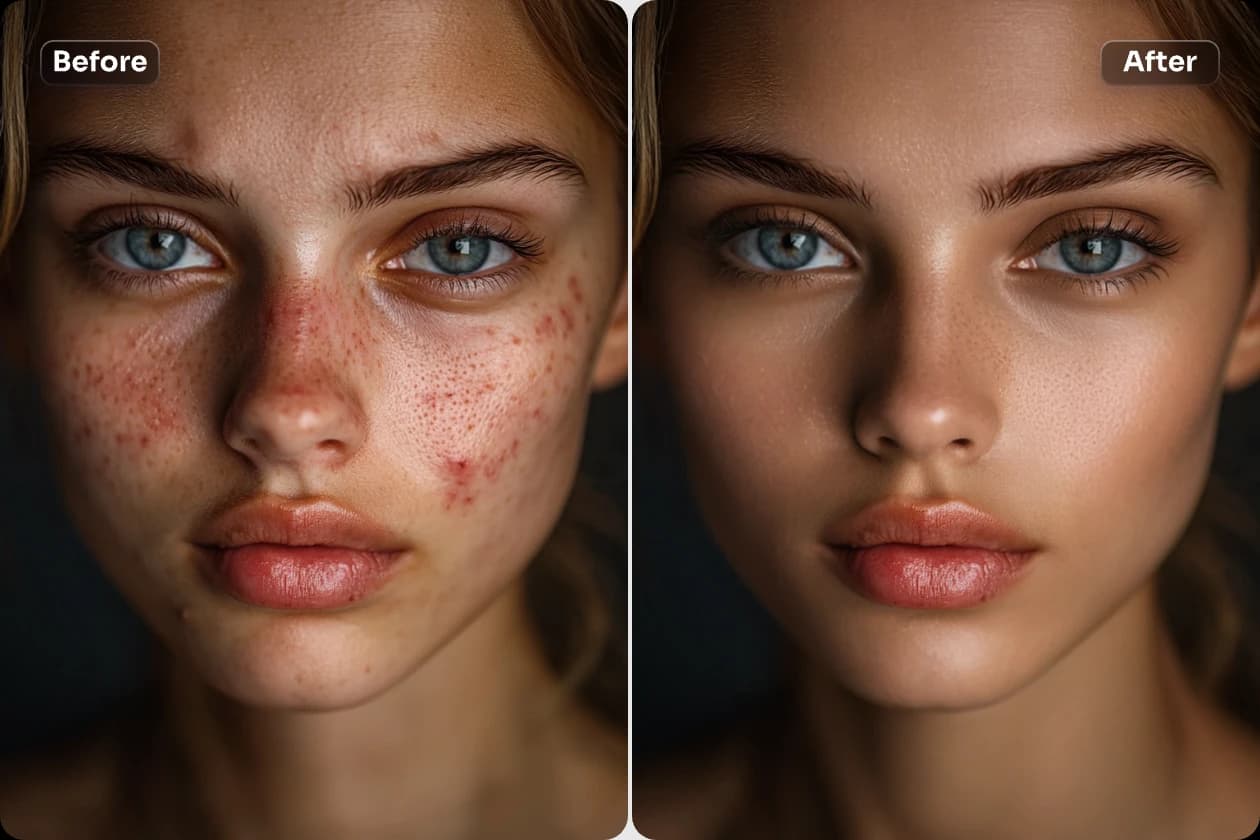
Upload your photo to experience intelligent skin retouching. One click to remove acne and pimples, smooth skin, and reveal natural beauty.

Skin Retouch banner showing example of acne removal and skin smoothing

Upload a photo for retouching

Tip: Please upload a clear facial photo for the best results

Retouch Result

Your retouched result will appear here once completed

History

No history available

Your retouch results will be displayed here

  • โ€ขUpload a frontal photo with good lighting to ensure the face is clearly visible
  • โ€ขSkin smoothness adjusts the natural level of texture; setting it too high may lose realism
  • โ€ขAcne removal intensity controls how strongly blemishes are removed; adjust as needed
๐Ÿ”— Love this tool? Share it with friends!

How to Swap Faces in 3 Simple Steps

๐Ÿ“ค
01

Upload Photos

Upload a source face and a target photo. Supported formats: JPG, PNG, WEBP.

๐Ÿค–
02

AI Processing

Our advanced AI analyzes facial features and swaps them seamlessly in seconds.

โœจ
03

Download Result

Preview your face swap and download the HD image watermark-free.

Why You'll Love Our Beauty AI

โœจ

Natural Glow

๐ŸŽฏ

Smart Detection

๐Ÿ˜Š

Keep Your Look

โšก

Instant Results

๐Ÿ‘ฅ

Group Ready

๐Ÿ“ฑ

Social Ready

Perfect Skin For Every Occasion

๐Ÿ’•

Dating Apps

๐Ÿ’ผ

LinkedIn

๐Ÿ“ธ

Instagram

๐ŸŽ‚

Event Photos

What is AI Skin Retouch? Complete Guide 2026

AI Skin Retouch uses advanced AI to automatically enhance skin in photos - removing blemishes, smoothing texture, and evening out skin tone while maintaining a natural, realistic look.

Unlike heavy filters that make skin look fake, our AI intelligently identifies and corrects imperfections while preserving natural skin texture and features.

Perfect for selfies, profile pictures, dating apps, or any photo where you want to look your best!

How Does AI Skin Retouch Work?

The AI analyzes your skin pixel by pixel, identifying blemishes, uneven tone, and texture issues. It then applies targeted corrections that blend naturally with surrounding skin.

How to Use AI Skin Retouch

1

Upload Photo

Upload any photo with visible face and skin.

๐Ÿ’ก Works with selfies, portraits, group photos.
2

Auto Detection

AI automatically detects face and skin areas.

๐Ÿ’ก Handles multiple faces in one photo.
3

Process

AI enhances skin while preserving natural look.

๐Ÿ’ก Processing takes just seconds.
4

Preview Result

See before/after comparison of your photo.

๐Ÿ’ก Zoom in to see detailed improvements.
5

Download

Download your enhanced photo in HD.

๐Ÿ’ก No watermark, ready to share.

AI Skin Retouch Features

โœจ

Natural Glow

Adds healthy glow without looking artificial.

Key Benefits:

  • Dewy skin effect
  • Not over-processed
๐ŸŽฏ

Smart Detection

AI identifies and fixes specific imperfections.

Key Benefits:

  • Targets problem areas
  • Preserves good skin
๐Ÿ˜Š

Keeps Character

Preserves your unique features and expressions.

Key Benefits:

  • Still looks like you
  • Natural enhancement
โšก

One-Click

No manual adjustments needed - AI does everything.

Key Benefits:

  • Instant results
  • No learning curve
๐Ÿ‘ฅ

Multi-Face

Works on group photos with multiple people.

Key Benefits:

  • Everyone enhanced
  • Consistent quality
๐Ÿ’ฐ

Free

Professional skin retouch at no cost.

Key Benefits:

  • Unlimited use
  • No watermarks

AI Skin Retouch Use Cases

๐Ÿ’•

Dating Apps

Look your best on dating profiles.

๐Ÿ“ Example:

Enhance your photos for Tinder, Bumble, Hinge without looking fake.

๐Ÿ’ผ

Professional Photos

Polish headshots and professional portraits.

๐Ÿ“ Example:

Get studio-quality skin for LinkedIn and business profiles.

๐Ÿ“ธ

Social Media

Perfect every selfie before posting.

๐Ÿ“ Example:

Quick enhancement for Instagram, TikTok, and more.

๐ŸŽ‚

Event Photos

Fix skin issues in important event photos.

๐Ÿ“ Example:

Rescue photos with bad lighting or tired skin.

AI Skin Retouch Comparison

FeatureFaceSwapAIOthers
Natural Lookโœ“Very naturalโœ—Often fake
Processingโœ“Automaticโœ—Manual
Speedโœ“Secondsโœ—Minutes
Priceโœ“Freeโœ—Paid
Multi-faceโœ“Yesโœ—Single only
Watermarkโœ“Noneโœ—Yes

Skin Retouch Tips

๐Ÿ’กGood Lighting

Photos with decent lighting produce the best enhancement results.

๐Ÿ’กClear Face

Make sure your face is clearly visible without obstructions.

๐Ÿ’กTry Multiple Photos

Different photos may produce different results - try a few!

๐Ÿ’กZoom to Check

Zoom in on the result to verify natural-looking texture.

Related Tools

Glow Up Skin FAQs

Find answers to the most commonly asked questions

Get that glass skin glow! Our AI smooths, brightens, and enhances naturally - no plastic look, just gorgeous you! โœจ
Absolutely! Remove dark circles, tired skin, and blemishes in seconds. Look like you got 8 hours of sleep!
Nope! Our AI keeps your natural texture. It's like having perfect lighting everywhere you go.
Selfies, group photos, mirror pics - we've got you covered! Perfect for dating apps and social media.
Totally free! Look your best without spending a dime. No watermarks, no limits!

User Reviews

What 3 users are saying

4.7
out of 5
โ˜…โ˜…โ˜…โ˜…โ˜…
Based on 3 reviews
D

David Thompson

โ˜…โ˜…โ˜…โ˜…โ˜…

The face swap accuracy is incredible! I used it for a creative project and the results were seamless.

April 20, 2025
J

Jessica Adams

โ˜…โ˜…โ˜…โ˜…โ˜†

It worked perfectly with clear images, but struggled a bit with low-light photos.

March 12, 2025
M

Michael Brown

โ˜…โ˜…โ˜…โ˜…โ˜…

Super fun and surprisingly realistic swaps!

February 1, 2025