FaceSwapAI Logo - AI Face Swap Technology
Face Swap AI

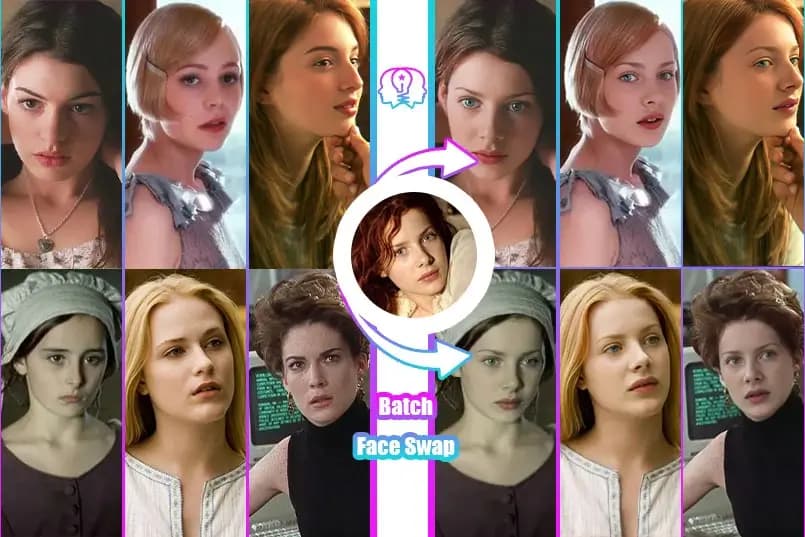
Batch AI Face Swap

Use advanced AI technology to batch replace faces in multiple images with one click. Supports replacing multiple target images with one source image, or replacing one target image with multiple source images.

Batch Face Swap example banner showing face swap demo

Upload Source Image (the face to replace)

Upload an image containing the face to be replaced

Source

Upload Target Images (multiple)

Click to upload multiple images containing faces to be replaced

Target

Select Template
Batch Image Swap template 1 preview
Preview
Batch Image Swap template 2 preview
Preview
Batch Image Swap template 3 preview
Preview

Results

After uploading source and target images, click "Start Batch Processing"

History

No history yet

Processed images will be displayed here

Tips

  • Make sure faces are clearly visible in uploaded images
  • Good lighting and front-facing photos work best
  • Up to 10 images can be processed at once
🔗 Love this tool? Share it with friends!

How to Swap Faces in 3 Simple Steps

📤
01

Upload Photos

Upload a source face and a target photo. Supported formats: JPG, PNG, WEBP.

🤖
02

AI Processing

Our advanced AI analyzes facial features and swaps them seamlessly in seconds.

03

Download Result

Preview your face swap and download the HD image watermark-free.

Batch Features

📦

Batch Processing

Process hundreds of photos simultaneously.

⏱️

Time Saving

Save hours of manual work.

📊

Consistent Results

Same quality across all images.

Ideal For

🏢

Business

Perfect for marketing campaigns.

📸

Photography

Ideal for photographers.

What is Batch Face Swap? Complete Guide 2026

Batch Face Swap lets you process multiple images at once with the same source face. Perfect for creating consistent content series, processing event photos, or bulk editing.

Upload one source face and multiple target images - our AI will swap faces in all images simultaneously, saving you hours of manual work.

Ideal for content creators, photographers, and anyone who needs to process many images quickly and consistently.

How Does Batch Processing Work?

Upload your source face once, then add up to 10 target images. The AI queues all images and processes them in parallel, applying consistent face swapping across the entire batch.

How to Use Batch Face Swap

1

Upload Source Face

Upload the face you want to appear in all images.

💡 Enterprise Security: All data is encrypted and automatically purged within 24 hours. Professional-grade AI tools—please ensure compliance with applicable laws and third-party rights.
2

Add Target Images

Upload up to 10 target images at once.

💡 Enterprise Security: All data is encrypted and automatically purged within 24 hours. Professional-grade AI tools—please ensure compliance with applicable laws and third-party rights.
3

Start Batch Process

Click process and AI handles all images.

💡 Enterprise Security: All data is encrypted and automatically purged within 24 hours. Professional-grade AI tools—please ensure compliance with applicable laws and third-party rights.
4

Review Results

Preview all swapped images in gallery view.

💡 Enterprise Security: All data is encrypted and automatically purged within 24 hours. Professional-grade AI tools—please ensure compliance with applicable laws and third-party rights.
5

Download All

Download all results as a ZIP file.

💡 Enterprise Security: All data is encrypted and automatically purged within 24 hours. Professional-grade AI tools—please ensure compliance with applicable laws and third-party rights.

Batch Face Swap Features

📦

Process Up to 10

Swap faces in up to 10 images at once.

Key Benefits:

  • Massive time savings
  • Consistent results

Parallel Processing

All images processed simultaneously.

Key Benefits:

  • Faster than one-by-one
  • Efficient queue system
📥

Bulk Download

Download all results in one ZIP file.

Key Benefits:

  • No individual downloads
  • Organized output
🔄

Re-process Option

Re-process individual images without restarting.

Key Benefits:

  • Fix specific images
  • Keep good results
📊

Progress Tracking

See status of each image in real-time.

Key Benefits:

  • Know what's processing
  • Estimated completion time
💰

Free Batch

Batch processing included free.

Key Benefits:

  • No premium needed
  • Full functionality free

Batch Face Swap Use Cases

📸

Event Photos

Process all photos from an event quickly.

📝 Example:

Swap faces in all party photos for a fun gift.

📱

Content Series

Create consistent face swaps for content series.

📝 Example:

Make a series of memes with the same face quickly.

🎨

Creative Projects

Artists use batch for series with consistent faces.

📝 Example:

Create art series where one face appears in different scenes.

👔

Professional Use

Quick editing for professional photo needs.

📝 Example:

Process multiple headshots or marketing materials.

Batch Processing Comparison

FeatureFaceSwapAIOthers
Max Images10 at once1-3 only
Parallel ProcessingYesSequential
Bulk DownloadZIP fileIndividual
PriceFreePremium
Re-processIndividualAll or nothing
Progress TrackingReal-timeNone

Batch Processing Tips

💡Same Quality Source

Use a high-quality source face for consistent results across all images.

💡Similar Target Images

Batch works best when target images have similar lighting and angles.

💡Check Before Bulk Download

Preview all results before downloading to catch any issues.

💡Organize Targets

Name your files clearly so downloaded results are easy to identify.

Related Tools

Batch Processing FAQs

Find answers to the most commonly asked questions

Up to 100 photos per batch for free.
Yes, completely free!

User Reviews

What 3 users are saying

4.7
out of 5
★★★★★
Based on 3 reviews
D

David Thompson

★★★★★

The face swap accuracy is incredible! I used it for a creative project and the results were seamless.

April 20, 2025
J

Jessica Adams

★★★★

It worked perfectly with clear images, but struggled a bit with low-light photos.

March 12, 2025
M

Michael Brown

★★★★★

Super fun and surprisingly realistic swaps!

February 1, 2025