FaceSwapAI Logo - AI Face Swap Technology
Face Swap AI

Retoque de Pele com IA

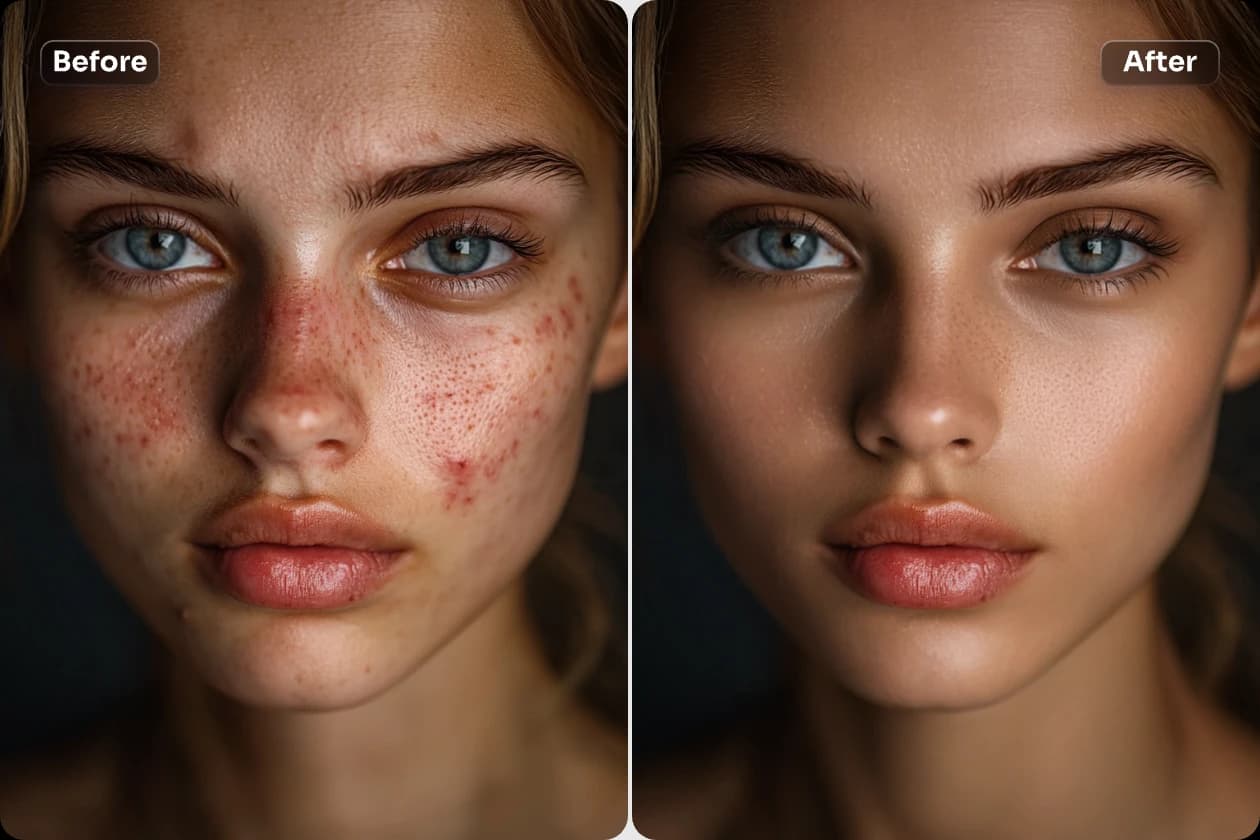
Envie sua foto e experimente o retoque inteligente de pele. Remova acne e espinhas com um clique, suavize a pele e revele sua beleza natural.

Skin Retouch banner showing example of acne removal and skin smoothing

Envie uma foto para retoque

Dica: envie uma foto clara do rosto para melhores resultados

Resultado do retoque

Seu resultado aparecerá aqui quando concluído

Histórico

Nenhum histórico disponível

Seus resultados aparecerão aqui

  • Envie uma foto frontal com boa iluminação para garantir que o rosto esteja claramente visível
  • O nível de suavidade da pele ajusta a naturalidade da textura; muito alto pode perder o realismo
  • A intensidade da remoção de acne controla o quanto as imperfeições serão removidas; ajuste conforme necessário
🔗 Gostou? Compartilhe com seus amigos!

Troque rostos em 3 passos

📤
01

Enviar fotos

Envie um rosto fonte e uma foto alvo. Formatos: JPG, PNG, WEBP.

🤖
02

Processamento AI

Nossa IA analisa características faciais e as troca em segundos.

03

Baixar resultado

Visualize e baixe a imagem HD sem marca d'água.

Recursos

Skin Smoothing

Remove blemishes and smooth skin naturally.

🎨

Tone Adjustment

Even out skin tone automatically.

💫

Natural Look

Enhance without looking fake.

Casos de Uso

📸

Portraits

Perfect for portrait photography.

💼

Professional

Great for LinkedIn and headshots.

What is AI Skin Retouch? Complete Guide 2026

AI Skin Retouch uses advanced AI to automatically enhance skin in photos - removing blemishes, smoothing texture, and evening out skin tone while maintaining a natural, realistic look.

Unlike heavy filters that make skin look fake, our AI intelligently identifies and corrects imperfections while preserving natural skin texture and features.

Perfect for selfies, profile pictures, dating apps, or any photo where you want to look your best!

How Does AI Skin Retouch Work?

The AI analyzes your skin pixel by pixel, identifying blemishes, uneven tone, and texture issues. It then applies targeted corrections that blend naturally with surrounding skin.

How to Use AI Skin Retouch

1

Upload Photo

Upload any photo with visible face and skin.

💡 Works with selfies, portraits, group photos.
2

Auto Detection

AI automatically detects face and skin areas.

💡 Handles multiple faces in one photo.
3

Process

AI enhances skin while preserving natural look.

💡 Processing takes just seconds.
4

Preview Result

See before/after comparison of your photo.

💡 Zoom in to see detailed improvements.
5

Download

Download your enhanced photo in HD.

💡 No watermark, ready to share.

AI Skin Retouch Features

Natural Glow

Adds healthy glow without looking artificial.

Benefícios:

  • Dewy skin effect
  • Not over-processed
🎯

Smart Detection

AI identifies and fixes specific imperfections.

Benefícios:

  • Targets problem areas
  • Preserves good skin
😊

Keeps Character

Preserves your unique features and expressions.

Benefícios:

  • Still looks like you
  • Natural enhancement

One-Click

No manual adjustments needed - AI does everything.

Benefícios:

  • Instant results
  • No learning curve
👥

Multi-Face

Works on group photos with multiple people.

Benefícios:

  • Everyone enhanced
  • Consistent quality
💰

Free

Professional skin retouch at no cost.

Benefícios:

  • Unlimited use
  • No watermarks

AI Skin Retouch Use Cases

💕

Dating Apps

Look your best on dating profiles.

📝 Exemplo:

Enhance your photos for Tinder, Bumble, Hinge without looking fake.

💼

Professional Photos

Polish headshots and professional portraits.

📝 Exemplo:

Get studio-quality skin for LinkedIn and business profiles.

📸

Social Media

Perfect every selfie before posting.

📝 Exemplo:

Quick enhancement for Instagram, TikTok, and more.

🎂

Event Photos

Fix skin issues in important event photos.

📝 Exemplo:

Rescue photos with bad lighting or tired skin.

AI Skin Retouch Comparison

FunçãoFaceSwapAIOutros
Natural LookVery naturalOften fake
ProcessingAutomaticManual
SpeedSecondsMinutes
PriceFreePaid
Multi-faceYesSingle only
WatermarkNoneYes

Skin Retouch Tips

💡Good Lighting

Photos with decent lighting produce the best enhancement results.

💡Clear Face

Make sure your face is clearly visible without obstructions.

💡Try Multiple Photos

Different photos may produce different results - try a few!

💡Zoom to Check

Zoom in on the result to verify natural-looking texture.

Ferramentas

Perguntas Frequentes Retoque de Pele

Respostas às perguntas mais frequentes

Sim, melhoria natural sem artificialidade.
Sim, retoca todos os rostos.
Não, completamente automático.
Sim, sem custo.

Avaliações de Usuários

O que 3 usuários estão dizendo

4.7
de 5
★★★★★
Baseado em 3 avaliações
R

Rafael Lima

★★★★★

Troca de rosto muito precisa, parece real!

April 2, 2025
B

Beatriz Carvalho

★★★★

Funciona muito bem em fotos claras, mas sofre um pouco em ambientes escuros.

March 21, 2025
J

João Pedro

★★★★★

Simplesmente incrível, resultado natural e divertido.

January 30, 2025