
AI Photo Face Swap
Upload your photos and experience cutting-edge AI face swap technology. Seamlessly blend your face into any image in seconds.
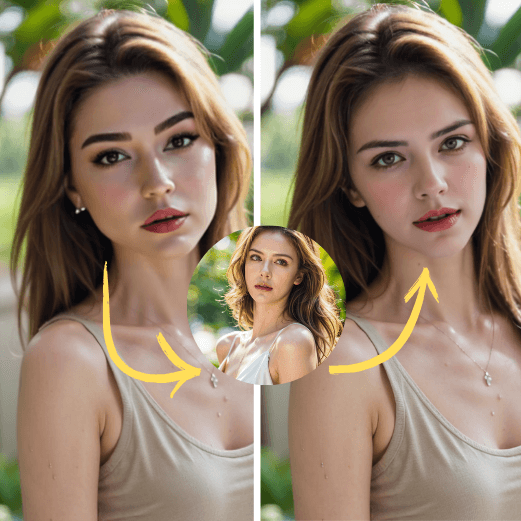
Upload Source Face
Drop image here or click to upload
✨ No Login Needed
Upload Target Photo
Drop image here or click to upload
✨ No Login Needed
🎉 Your Face Swap Result
Result will appear here
💰 Cost: 2 Credits
✓ Credits required • Buy credits to start
Explore More AI Tools
How to Swap Faces in 3 Simple Steps
Upload Photos
Upload a source face and a target photo. Supported formats: JPG, PNG, WEBP.
AI Processing
Our advanced AI analyzes facial features and swaps them seamlessly in seconds.
Download Result
Preview your face swap and download the HD image clean HD.
Core Advantages
Fast AI Processing
Generate face swap results in seconds with our optimized AI engine.
High Quality
Professional grade output suitable for social media and commercial use.
Secure & Private
Files are processed securely and deleted automatically after 24 hours.
Fun Use Cases
Social Media
Create viral content for TikTok, Instagram, and YouTube.
Creative Design
Perfect for artists, designers, and content creators.
📑 Table of Contents
What is AI Face Swap? Complete Guide 2026
AI Face Swap is a revolutionary technology that uses advanced artificial intelligence and deep learning algorithms to seamlessly replace faces in photos. Unlike traditional photo editing that requires hours of manual work, our AI-powered face swap tool can produce professional-quality results in just seconds.
Our face swap technology utilizes state-of-the-art neural networks trained on millions of facial images. The AI analyzes facial features, skin tones, lighting conditions, and facial expressions to create natural-looking results that are virtually indistinguishable from real photos.
Whether you want to create funny memes, see yourself in movie scenes, or just have fun with friends, our AI face swap tool makes it incredibly easy. No technical skills required – just upload your photos and let our AI do the magic.
How Does AI Face Swap Technology Work?
The process involves three key steps: First, our AI detects and maps all facial landmarks in both the source and target images. Then, it analyzes the lighting, angle, and skin tone to ensure perfect matching. Finally, advanced blending algorithms seamlessly merge the faces while preserving natural details like hair, accessories, and background elements.
How to Use AI Face Swap: Step-by-Step Tutorial
Step 1: Upload Your Source Face
Select a clear, front-facing photo of the face you want to use. For best results, choose a photo with good lighting, neutral expression, and the face clearly visible without obstructions.
Step 2: Upload Your Target Photo
Choose the photo where you want the face to appear. This can be a movie scene, celebrity photo, historical image, or any creative scenario you can imagine.
Step 3: Click Process and Wait
Hit the 'Swap Faces' button and our AI will start processing. The advanced neural network analyzes both images and performs the swap automatically.
Step 4: Preview Your Result
Once processing is complete, you'll see a preview of your face-swapped image. Review the result to ensure it meets your expectations.
Step 5: Download HD Image
Happy with the result? Click the download button to save your face-swapped image in high resolution. The image is yours to use and share!
Key Features of Our AI Face Swap Tool
Lightning Fast Processing
Our optimized AI infrastructure processes face swaps in just 10-30 seconds. No more waiting hours for results like traditional photo editing software.
Key Benefits:
- Save hours compared to manual Photoshop editing
- Instant preview of results before downloading
Precision Face Detection
Advanced facial landmark detection identifies 68+ key points on each face, ensuring accurate alignment and natural-looking results every time.
Key Benefits:
- Works with various face angles and expressions
- Handles partial occlusions like glasses and hair
Intelligent Color Matching
Our AI automatically adjusts skin tones, lighting, and shadows to match the target image, creating seamless and realistic face swaps.
Key Benefits:
- No manual color correction needed
- Works across different ethnicities and skin tones
100% Private & Secure
Your photos are encrypted during processing and automatically deleted within 24 hours. We never store, share, or use your images for any other purpose.
Key Benefits:
- End-to-end encryption for all uploads
- GDPR compliant data handling
Completely Free to Use
Enjoy unlimited face swaps without any cost. No hidden fees, clean HD output, no registration required. Just pure creative fun!
Key Benefits:
- No credit card or account needed
- Full HD quality downloads included
Works on Any Device
Our web-based tool works on desktop, tablet, and mobile devices. No app installation needed - just visit our website and start swapping!
Key Benefits:
- Compatible with all modern browsers
- Responsive design for mobile users
Popular Use Cases for AI Face Swap
Social Media Content & Memes
Create hilarious memes and viral content by swapping faces with celebrities, movie characters, or historical figures. Perfect for TikTok, Instagram, and Twitter engagement.
📝 Example:
Swap your face onto famous movie scenes like The Avengers or classic paintings like the Mona Lisa to create shareable content that gets likes and comments.
Entertainment & Fun with Friends
Have fun with friends and family by swapping faces in group photos. See what you'd look like as each other, or create funny gift cards and party invitations.
📝 Example:
Create a custom birthday card by swapping your friend's face onto their favorite superhero or celebrity, making a memorable personalized gift.
Cosplay & Character Visualization
Preview yourself as different characters before investing in costumes. Perfect for cosplayers, Halloween planning, or just exploring different looks.
📝 Example:
Before buying an expensive cosplay costume, see how you'd look as that anime character or superhero by face swapping onto reference images.
Professional Creative Projects
Designers and content creators use face swap for mockups, presentations, and creative visualizations. Speed up your workflow with AI-powered face replacement.
📝 Example:
Marketing teams can quickly create localized ad campaigns by swapping model faces to match different target demographics.
FaceSwapAI vs Other Face Swap Tools
| Feature | FaceSwapAI | Others |
|---|---|---|
| Processing Speed | ✓10-30 seconds | ✗1-5 minutes |
| Free Usage | ✓Unlimited free | ✗Limited/Paid |
| Registration Required | ✓No signup needed | ✗Account required |
| Output Quality | ✓Full HD | ✗Compressed |
| Privacy Protection | ✓24hr auto-delete | ✗Data retained |
| Watermark | ✓Clean HD | ✗Watermarked |
Pro Tips for Best Face Swap Results
💡Choose High-Quality Source Photos
Use clear, well-lit photos where the face is directly facing the camera. Avoid blurry images, extreme angles, or photos where the face is partially covered. Resolution of at least 512x512 pixels is recommended.
💡Match Face Angles for Natural Results
For the most realistic swaps, try to match the face angle in both source and target photos. A front-facing source face works best with a front-facing target, while angled faces should be paired with similar angles.
💡Consider Lighting Conditions
While our AI adjusts for lighting differences, starting with photos that have similar lighting conditions produces the most seamless results. Avoid mixing harsh sunlight photos with indoor shots when possible.
💡Experiment with Multiple Attempts
If your first swap doesn't look perfect, try different source photos. Sometimes a slight change in expression or angle in your source face can dramatically improve the final result.
Related Tools
FAQs of AI Face Swap
Find answers to the most commonly asked questions
User Reviews
What 3 users are saying
David Thompson
The face swap accuracy is incredible! I used it for a creative project and the results were seamless.
Jessica Adams
It worked perfectly with clear images, but struggled a bit with low-light photos.
Michael Brown
Super fun and surprisingly realistic swaps!